When you’re scrolling through Instagram in your free time or for work, you may come across Reels that you want to save for later. It could be a Reel related to your work, study projects, personal growth, entertainment, or something you simply want to keep for personal reference.
Instagram allows users to save Reels within the app, but those saved Reels remain inside Instagram. If you want to keep a Reel on your device for offline viewing or personal reference, an online Instagram Reel Downloader can be useful.
In this guide, we’ll explain different ways to save Instagram Reels and how you can download them quickly using an online Instagram Reel Downloader.
Here’s what we’ll cover:
- Knowing Instagram Reels and Why People Want to Save Them
- Four Easy Methods to Save Instagram Reels to Your Device
- How to Download Instagram Reels Within Seconds Without Complex Steps
- How to Stay Safe and Respect Copyright Before Sharing or Reuploading Downloaded Reels
Knowing Instagram Reels and Why People Want to Save Them
Instagram introduced Reels as short-form video content in 2020. Since then, Reels have become a popular way to discover tutorials, educational content, entertainment, inspiration, tips, and much more.
Reels can contain audio, effects, captions, and text overlays, making information easy to understand while keeping the content entertaining. Instagram’s recommendation system also shows users Reels based on their interests, which makes it easy to discover useful and engaging videos.
Instagram has a built-in Save feature that lets you bookmark Reels. However, saved Reels remain inside Instagram and are not automatically stored in your device’s gallery. You need to open Instagram and have an internet connection to access them.
If you want to keep a Reel on your device for personal reference or offline viewing, you may need to use Instagram’s available download option or an online Instagram Reel Downloader, depending on the Reel and its availability.
Four Easy Methods to Save Instagram Reels to Your Device
There are several ways to save Instagram Reels, either inside Instagram or directly to your device.
1. Keep Reels Inside Instagram
If you simply want to find a favorite Reel again later, Instagram’s built-in Save feature is the easiest option.
Open the Reel you want to save and tap the Save icon. Depending on your device and Instagram’s current interface, the location of the option may vary.
The Reel will be stored in your Saved section, which is private and generally visible only to you.
However, this does not download the Reel to your phone or computer. The Reel remains available through Instagram, so you’ll generally need an internet connection to watch it again.
2. Download Instagram Reels Using Instagram’s Download Option
Instagram also provides a Download option for some Reels.
When available, you may see the Download option alongside actions such as Share and Copy Link. Tapping Download can save the Reel directly to your device’s gallery or camera roll.
However, the download option is not available for every Reel. Availability can depend on factors such as the creator’s settings, the type of content, or Instagram’s current features.
In some cases, downloaded content may also have audio restrictions.
3. Save Instagram Reels by Recording Your Device’s Screen
Another option is your device’s built-in screen recording feature.
First, open Instagram and find the Reel you want to save. You can save the Reel inside Instagram first so you can easily find it again.
Then start your device’s screen recording, play the Reel, and stop recording when the video finishes.
The recording will normally be saved to your device’s gallery or camera roll.
This method can be useful when Instagram’s Download option isn’t available, although the resulting video may not have the same quality as the original Reel. You may also need to trim the beginning or end of the recording afterward.
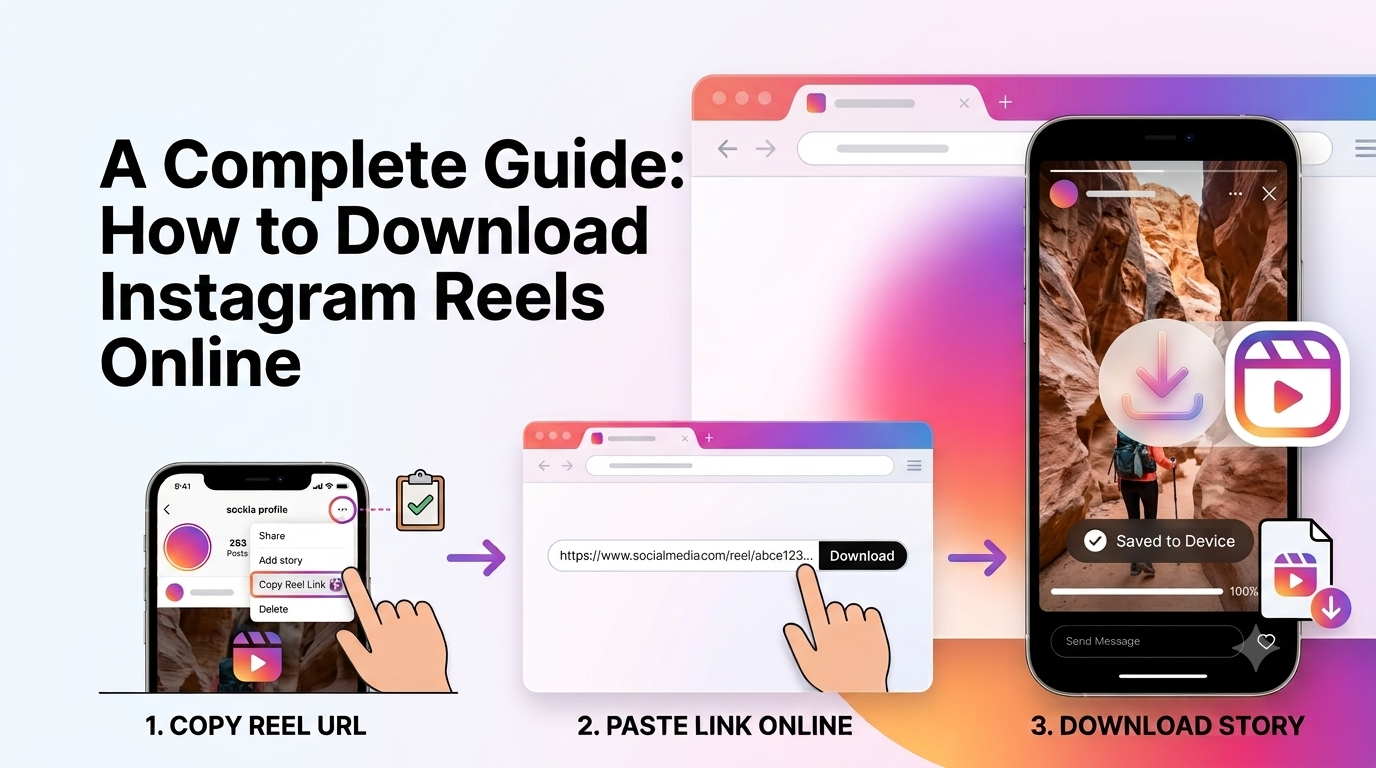
4. Save Instagram Reels Using an Online Instagram Reel Downloader
One of the easiest ways to save an Instagram Reel to your device is by using an online Instagram Reel Downloader.
With an online downloader such as FastReelSaver, you generally only need the Reel’s URL.
Here’s how it works:
- Open Instagram and find the Reel you want to save.
- Tap the Share option.
- Select Copy Link.
- Open FastReelSaver in your device’s browser.
- Paste the copied Reel link into the input box.
- Click Download.
- Once the Reel is processed, click the download option again to save the video to your device.
This method doesn’t require you to install an additional application, making it convenient when you want to save a Reel quickly.
How Can I Download Instagram Reels Within Seconds Without Any Hassle?
Yes, downloading an Instagram Reel can be a simple process when you use an online Reel Downloader.
You don’t need advanced technical knowledge. All you need is the link to the Reel and a device with an internet connection.
Follow these steps:
Step 1: Find the Instagram Reel
Open Instagram on your phone, tablet, or computer and find the Reel you want to save.
Step 2: Copy the Instagram Reel Link
Once you find the Reel, tap the Share button and select Copy Link.
The Reel URL will be copied to your device’s clipboard.
Step 3: Open an Instagram Reel Downloader
Open your device’s web browser and search for Instagram Reel Downloader or directly open FastReelSaver.
The Instagram Reel Downloader page will provide an input box where you can enter the Reel URL.
Step 4: Paste the Reel Link
Paste the Instagram Reel link you copied from Instagram into the input box.
Make sure you have copied the link of the specific Reel rather than the Instagram profile URL.
Step 5: Download the Reel
Click the Download button.
The tool will process the Reel and provide a download option when the file is ready. Click Download again to save the Reel to your device.
That’s it. You can now access the downloaded file from your device storage or gallery, depending on your device and browser.
How to Stay Safe and Respect Copyright Before Sharing or Reuploading Downloaded Reels
Downloading a Reel and having permission to reuse it are two different things.
Before sharing, editing, or reuploading someone else’s Reel, make sure you understand the creator’s rights and any applicable copyright rules.
If you want to use another person’s Reel publicly or commercially, it’s a good idea to ask the creator for permission first. Giving credit is also good practice, but credit alone does not necessarily give you permission to reuse copyrighted content.
Keep the following points in mind:
- Download content for personal reference when appropriate.
- Don’t claim someone else’s Reel as your own.
- Ask the creator for permission before reuploading their content.
- Don’t use downloaded content commercially without the necessary rights or permission.
- Follow Instagram’s Terms of Use and applicable copyright laws.
- Be especially careful with content that could be misleading, harmful, or involved in illegal activities.
Copyright laws can vary depending on your country and situation, so this information is general guidance and not legal advice.
Use Genuine and Trusted Tools
When using an Instagram Reel Downloader, be careful about the information you provide.
A basic Reel downloader generally only needs the public Reel URL. You should never enter your Instagram password, authentication codes, or other sensitive account information into an unknown downloader.
For safer browsing:
- Never provide your Instagram login credentials to a downloader.
- Avoid websites that ask for unnecessary personal information.
- Don’t install unknown apps or browser extensions just to download a Reel.
- Be cautious with suspicious pop-ups and download buttons.
- Avoid clicking links that look unrelated to the download process.
- Use a reputable browser-based tool whenever possible.
These simple precautions can help you avoid sharing sensitive information with untrusted websites.
Frequently Asked Questions
Can I download Instagram Reels without logging in?
Yes. An online Instagram Reel Downloader can allow you to download eligible public Reel content without logging into your Instagram account. You generally only need to copy and paste the Reel link.
Can I save Instagram Reels to my phone gallery?
Yes. After downloading the Reel through a compatible downloader, the video can generally be saved to your device storage or gallery, depending on your browser and device.
Can I download Instagram Reels on iPhone?
Yes. You can use a browser-based Instagram Reel Downloader on an iPhone. Copy the Reel link from Instagram, open the downloader in Safari, paste the link, and download the resulting video.
Can I download Instagram Reels on Android?
Yes. Instagram Reel Downloaders work through mobile browsers such as Chrome. Copy the Reel URL from Instagram, paste it into the downloader, and save the resulting video to your device.
Can I download Instagram Reels on a computer?
Yes. You can use an online Instagram Reel Downloader through a desktop browser on Windows, Mac, or other supported systems.
Does Instagram notify someone when I download their Reel?
Instagram does not generally send a notification to a creator simply because you downloaded their Reel using an online downloader. However, Instagram’s features and policies can change over time.
Can I download private Instagram Reels?
Online third-party downloaders generally cannot access content from private accounts that they are not authorized to access. Only download content that you are permitted to access and use.
Is downloading Instagram Reels legal?
Downloading content does not transfer copyright ownership. Whether you can download, reuse, modify, or redistribute a Reel depends on factors such as copyright law, the creator’s rights, Instagram’s rules, and how you use the content.
For personal use, downloading may be treated differently from publicly reuploading or commercially using someone else’s copyrighted content. Always obtain permission when required.
Conclusion
Saving Instagram Reels doesn’t have to be complicated. You can keep a Reel inside Instagram using the Save feature, use Instagram’s own Download option when available, record your screen, or use an online Instagram Reel Downloader.
For a quick browser-based option, FastReelSaver lets you copy a Reel link, paste it into the downloader, and save the available video to your device.
Whatever method you choose, remember to protect your personal information and respect the rights of the original creator before sharing or reuploading downloaded content.
Download Instagram Reels → — Save your favorite Instagram Reels quickly using FastReelSaver. ```